One management system for scattered schedules and deliverables
Brought scattered deliverables into one management system — zero missed deliverable deadlines on a public project during my tenure
- Role
- Project management
- Period
- 2026.03 – 2026.04
- Type
- Suwon City Hall · Suwon Carbon-Neutral Green City Integrated Energy Control Service (B2G) · Work efficiency and project management
- Team
- PM 1 · Planning 1 · Project management 1 (me) · Development 26 (incl. me) · Design 3
Bottom line
- Project management
- WBS scheduling
- Unified document templates
- Structured folders
Zero missed deliverable deadlines during my tenure A system where schedules, deliverables and file locations live in one place
- 0Missed deliverable deadlines during my tenure
- 65 weeksMaster calendar covering the entire project
- ReusedFolder structure applied to other projects
Schedules, deliverables and file locations were scattered across KakaoTalk · Google Chat · Google Drive · NAS. I brought them into one management system with a master calendar, a NAS folder structure and naming rules.
- Assess current state
- Build an integrated schedule · deliverables master sheet
- Design NAS folder structure · naming rules
- Write report minutes · manage client materials
The early stage of a 17-month public project
We needed a document system where no one had to keep asking where the latest version was
The Suwon Carbon-Neutral Green City Integrated Energy Control Service was a long-term public project running 1 year and 5 months. From the early stage, kickoff · weekly · monthly reports and monthly deliverable deadlines were tightly scheduled, and I took on project management alongside development.
Schedules · deliverables · files · communication history were spread across several channels — KakaoTalk · Google Chat · Google Drive · NAS — and there was no single place to manage deliverable deadlines.
A structure where the same questions kept coming back
We had to re-check the latest version and its location every time
- Re-checking the latest version · location every timeScattered channels
- Different path formats per OS made even explaining file locations costlyWindows · macOS
- Missed deliverable submissions reported, with no unified deadline trackingNo deadline management
Why it matters
With weekly · monthly reports and deliverable deadlines running for 1 year and 5 months, checking costs and the risk of misses pile up the longer the project runs.
On a public project, a missed deliverable goes beyond schedule delays — it directly affects the client’s trust.
One system to see schedules and file locations at once
I made it so everything is seen in one place and saved by the same rules
- Observation
The same question — "Where’s the latest version?" — kept coming up, and even missed deliverable submissions were reported.
- Question
Instead of people remembering and asking every time, could we change the structure where the information lives?
- Decision
Schedules on one screen, files in set locations with set names. With one place to check, the questions go away.
- Solution 1Master calendar
- Before
- Schedules · deadlines · deliverables are scattered across KakaoTalk · Drive · NAS
- Insight
- If WBS · report schedules · deadlines · deliverables · file paths can be seen at once, no one needs to ask
- After
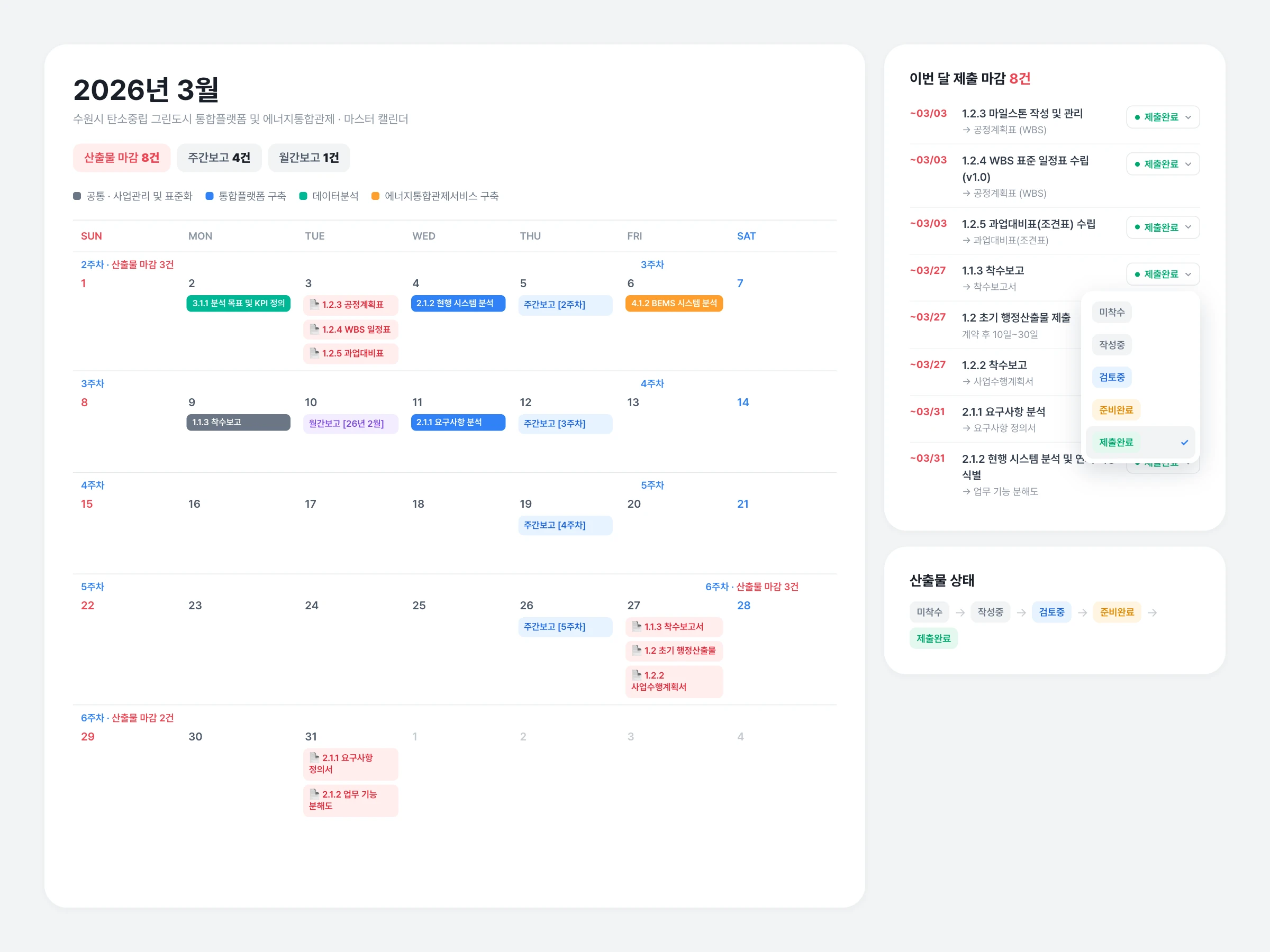
- Built a master calendar with Claude
- Shows phase colors · weekly · monthly reports · deliverable deadlines
- Deliverable status: not started → in progress → in review → ready → submitted
- Solution 2Automatic path conversion
- Before
- The same file is explained with different paths on each OS
- Insight
- Windows and Mac paths change by a regular rule — knowing one lets you calculate the other
- After
- Enter either a Windows or Mac path for automatic NAS path conversion
- Filters to minimize repeated checking
- Solution 3Folder structure · naming rules
- Before
- People ask where the latest version is every time
- Insight
- If where things go is decided from the start, no one needs to ask
- After
- Structured the NAS folders by week · internal · for submission
- Set document and file naming rules
Master calendar and folder structure guide
I built the system, then ran report meetings and client responses on top of it
- AssessCollect scattered schedules · deliverablesOrganized KakaoTalk · Drive · NAS history
- IntegrateMaster calendarWBS · reports · deadlines · deliverables · paths Automatic NAS path conversion · filters
- StructureNAS folders · naming rulesBy week · internal · for submission
- OperateReports · client responseKickoff · weekly · monthly report minutes Client materials prepared in advance
Master calendar
I laid out all 65 weeks of the project in one file, and for each week noted the tasks, deadlines and where the files were.
- ① Monthly summary
- Submission deadlines this month
- N deliverables
- N weekly reports
- N monthly reports
Shown at the top of each month, so what must not be missed that month is checked first.
- ② Calendar
- Common · project management
- Integrated platform build
- Data analysis
- Integrated energy control service build
Phases are color-coded, with weekly reports · monthly reports · deliverable deadlines shown as events.
- ③ File management
- Start · end date
- Deliverable name
- Status
- NAS path (Windows / Mac)
- Google Drive
Each item is managed on one row, with deliverable status tracked as not started → in progress → in review → ready → submitted.
Folder structure guide
There was one criterion for the folder structure: can someone seeing it for the first time find a file without asking?
The internal folder (where JH Solution keeps working documents) holds everything produced along the way — drafts · review copies · meeting materials · source files — and only final versions delivered to the client go in the submission folder. The internal folder is further divided by a numbering system following project stages.
- ① Split
- Internal · submission split
Working copies and final versions never mix, so the submission folder alone shows what was delivered to the client.
- ② Numbering
- Number = project order
Hundreds are project stages, tens are document types, ones are individual documents. Sorted by name, they line up in project order, and the number alone hints at the location.
- ③ Report folders
- Week-based report folders
Weekly report folders include both the week and the dates, like 'Week 1 (26.02.19~26.02.26)', so searching by date or by week lands in the same folder.
| No. | Stage | Documents |
|---|---|---|
| 100 | Contract & kickoff | 110 RFP · 120 Proposal · 130 Contract documents · 140 Working committee |
| 200 | Execution plan & kickoff report | 210 Kickoff report · 220 Project manager notice · 230 Service schedule · 240 Pledges · commitments · 250 Execution plan · 260 Cost breakdown · 270 Staffing plan · 280 Staffing evidence · 290 Scanned PDFs · official letters |
| 300 – 700 | Analysis · design · build · verification · operation | Deliverables by project stage |
| 800 | Reports | Weekly reports · monthly reports |
| Other | Templates | Standard templates · in-house templates |
Zero missed deliverable deadlines during my tenure
No more repeated checking, and the system carried over to later projects
Missed deliverable deadlines during my tenure
Simpler document · file search
The master calendar stayed in use for scheduling, and the folder structure was applied to other projects
Turning an inconvenience into a system gives the whole team time back
- Lesson 01
Recurring questions are a structure problem
When the same question keeps coming up, it’s not a people problem but a problem with how information is laid out. Decide locations and rules first, and the questions go away.
- Lesson 02
Systems born from small inconveniences last
The master calendar and folder structure, which started from inconveniences I felt at work, stayed in use after my tenure and became the standard for other projects.