An attendance system that fits our company
Interviewed each role about their pain points, then built and shipped a tailored attendance system
- Role
- Planning & Backend Development
- Period
- 2026.03 – 2026.04
- Type
- In-house attendance groupware · JH Solution Co., Ltd. backend development
- Team
- PM 1 · Development 2 (me, backend) · Design 1
Bottom line
- User interviews
- API interface definition
- QA / test scenarios
- Documentation
Requirements defined through role-based interviews became an attendance system actually used in-house
- 15 + 18Admin · user E2E test scenarios
- 12Defects fixed during real-use testing
- 3Role-specific manuals released
An attendance groupware where I turned the pain points of Corporate Support, managers and employees into requirements, first verified that the requirements, API spec and DB field-mapping documents were consistent, then built it with AI and shipped it in-house.
- User interviews
- Requirements
- API interface definition
- Design-doc Markdown & AI coding
- Test scenarios
- E2E tests
- Release
An outside groupware that didn’t fit how we clock in
Instead of the outside groupware, we decided to build an attendance system that fits how we work
The company used its own attendance rules, such as flexible start times (types A · B · C) and pre-approved early work. We decided to build our own attendance groupware tailored to how we work instead of using an outside product, and I took on the backend.
Same system, different pain points
Corporate Support, managers and employees each got stuck at different points in the same attendance work
Before deciding on features, I interviewed actual users about their workflow and pain points.
- Corporate SupportManaging clock-in/out records and checking correction requests was tedious
- ManagersHard to see leave · overtime approvals and team status at a glance
- EmployeesRepeated logins due to auto-logout, and complicated leave · overtime requests and submissions
Why it matters
Everyone handled the same attendance data, but each role got stuck at a different point. Starting from a feature list would fix one role’s pain and leave the others’ work untouched.
So I made 'who gets stuck where' the basis for requirements, rather than a feature list.
Turning pain points into rules
I defined each role’s pain points as status values and rules the system could handle consistently
- Observation
Employees pressed a separate clock-in button after logging in, and clocking out · logging out · overtime were mixed into one action. Late-arrival decisions shifted whenever managers approved corrections.
- Question
Could the system record intent accurately and judge by the same standard, without users having to think about it?
- Decision
Define pain points as status values and decision rules, not screen features. That way screens and server follow the same rules.
- Solution 1Auto clock-in
- Before
- Log in, then press a separate clock-in button
- Insight
- An employee arriving for work logs in for the first time that day anyway
- After
- Auto clock-in on the first login of the day
- Clock-in time kept on re-login
- Solution 2Clocking out
- Before
- Clocking out · logging out · overtime are mixed together
- Insight
- Stepping away and leaving for the day are different intents — the button has to separate them for accurate records
- After
- 3 actions: log out only · clock out · clock out after overtime
- Defined as common codes (0 · 1 · 2)
- Solution 3Late-arrival check
- Before
- Late-arrival decisions shift when the flex type changes
- Insight
- Lateness must be judged by the type in effect that day — using the type at correction time changes the result
- After
- Judged by the type in effect at clock-in, even when a correction is approved
Employment status (active · on leave · awaiting start · resigned) and roles (user · admin) were also defined with the same common codes as the frontend, so screens and server behave by the same rules.
Aligned in documents first, then built with AI
I verified the design documents were consistent before handing implementation to AI, then wrapped up with tests and manuals
AI coding driven by Markdown design documents
I first wrote the requirements · API spec · DB field mapping · interface definitions as Markdown documents, and handed implementation to AI only after verifying consistency across the documents. I created a step-by-step prompt guide so AI wouldn’t guess at anything not in the documents.
- AnalyzeAPI spec · interface definitionStatus codes · enums · URIs · request/response
- DesignDB schema · field mappingREQ ↔ DB ↔ RES mapping, DB–API consistency check
- BuildDoc-driven AI implementationEntity → Repository → Service → Controller
- VerifyTests · bug-fix historyNormal (CTC) · exception (ETC) test cases
User · admin flows
I turned the workflows from the interviews into end-to-end flows for user and admin screens.
Feature flowcharts
Screen design
Collaboration · verification · release
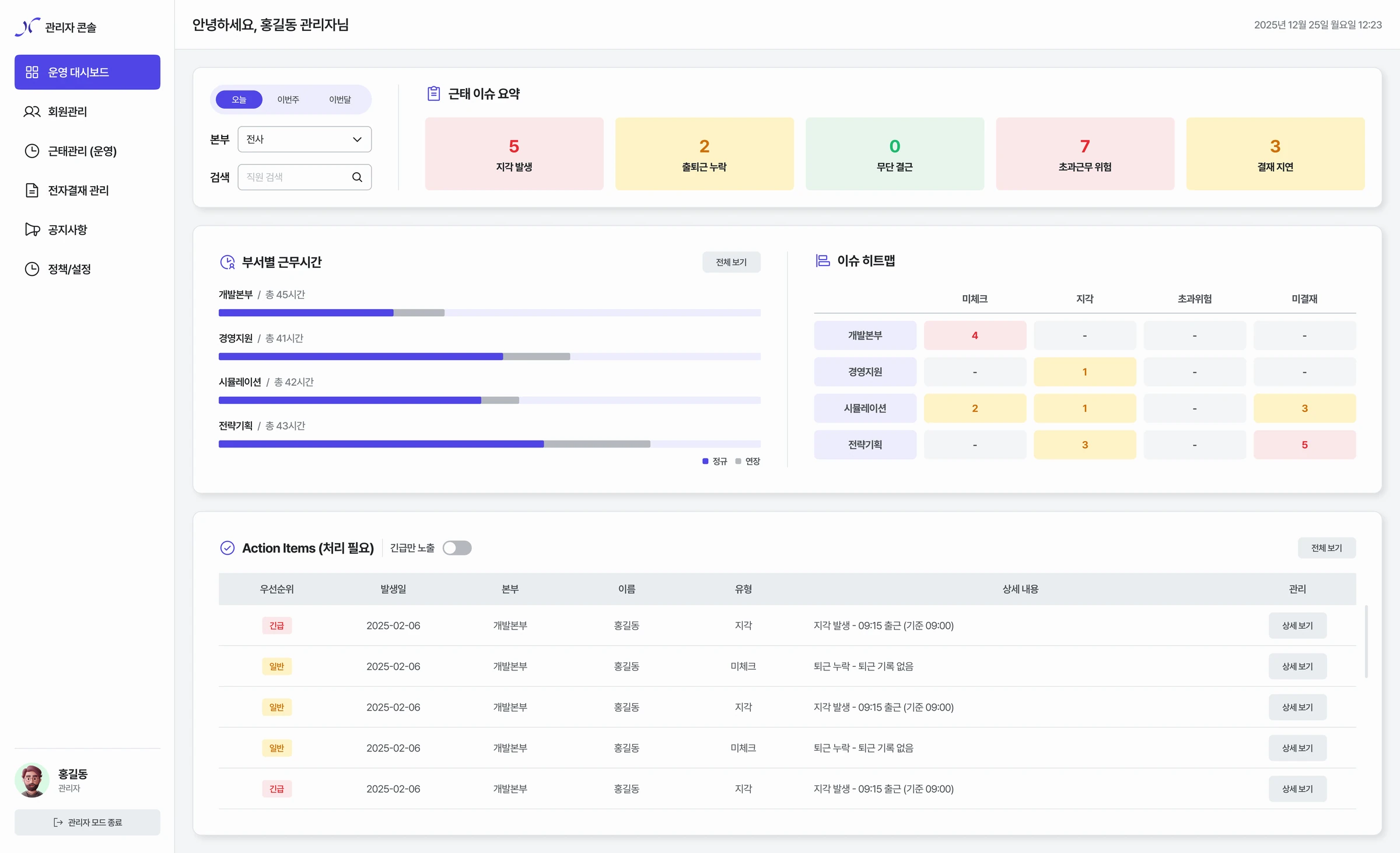
After implementation, I focused on aligning standards with the frontend and verifying with real usage flows.
- CollaborateAPI interface defined togetherAgreed status codes · common codes with frontend Tracked progress · defects on a shared issue board
- VerifyE2E test scenarios15 admin · 18 user scenarios co-written Run with Playwright
- Fix12 defects from real-use testingPermission checks · clock-out status updates Correction approval criteria
- Release3 role-specific manualsAdmin · user · new hire Shipped with the prototype, feedback reflected
I based the manuals on the test scenarios, so the flows we verified and the flows we explain to users are the same.
Tech and deliverables
- Backend
- Spring Boot
- PostgreSQL
- Redis
Built with AI in the order Entity → Repository → Service → Controller, based on the specs confirmed in documents.
- Test
- Playwright E2E
- Normal (CTC) · exception (ETC) test cases
Ran 33 admin · user flow scenarios and logged defects in the bug-fix history.
- Docs
- Markdown design docs
- API interface definition
- Service scenarios
- Issue board
Aligned requirements · API spec · DB field mapping in documents before starting implementation.
From gathering requirements to real use
Requirements defined through interviews became a system actually used in-house
I ran Playwright E2E tests with admin · user flow scenarios, released role-specific manuals, and fixed 12 defects during real-use testing.
Admin · user flow test scenarios (co-written with the frontend)
Role-specific manuals admin · user · new hire
Defects fixed during real-use testing
How users work comes before features
- Lesson 1
Start from how people work
Understanding how real users work, more than building many features, is where system planning starts.
- Lesson 2
AI is only as accurate as the documents
The quality of AI coding is decided less by prompts than by the consistency of the requirements and spec documents that come before them.