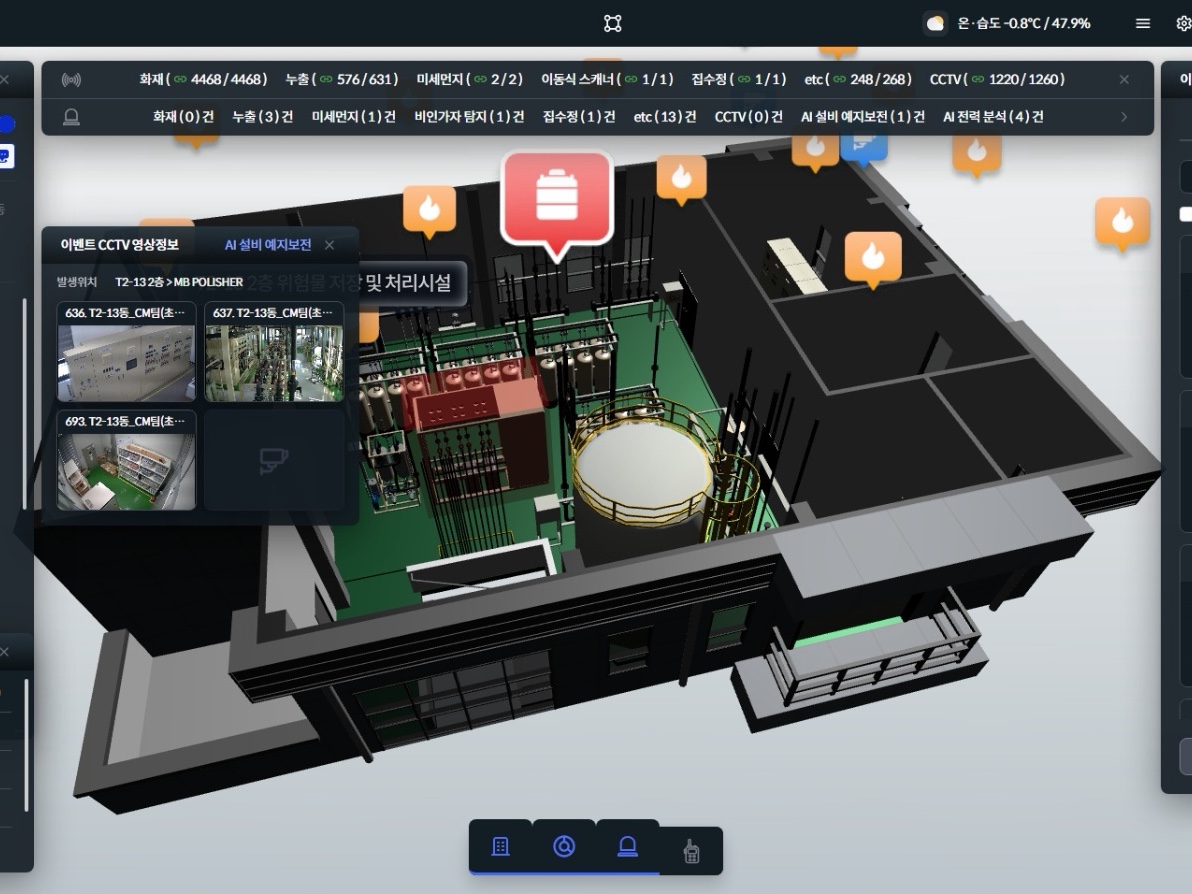
Semiconductor plant monitoring system
Before building anything new, I understood the structure of the system already in place
- Role
- Backend development (new feature · refactoring)
- Period
- 2025.12
- Type
- Soulbrain semiconductor plant monitoring system · JH Solution Co., Ltd. backend development
- Team
- Development team (joined an existing system)
Bottom line
- Existing system analysis
- Scheduler development
- Data parsing
- Hexagonal architecture
- Reviewing AI code
7 weather fields loaded automatically every 2 hours Added the feature without breaking the existing hexagonal structure
- 2hAutomatic weather data loading interval
- 7Weather fields parsed · loaded
- 10Broken log-line cases verified by tests
I joined a semiconductor plant monitoring system that collects and visualizes process · equipment status, built a weather data loading scheduler, and refactored existing code to follow the dependency direction of the hexagonal architecture.
- Existing code · architecture analysis
- Scheduler development
- SMB file reading · parsing
- Tests (unit · integration)
- Refactoring from code review
- Deployment
Joining a system that was mostly built
I was asked to add weather data loading to a plant monitoring system already in place
It was a monitoring system that collects the process · equipment status of a semiconductor plant and visualizes it as a 3D digital twin. It shows equipment locations by floor, real-time power · temperature · humidity and event alerts on one screen.
The system was already mostly built. My task was to read the log files the plant’s weather station (WXT530) writes every 10 seconds, parse them every 2 hours, and load them into the measurement table (sensor_measurement).
Code that runs isn’t the same as code that fits
The feature worked quickly, but one by one, places that didn’t fit the existing structure and production environment surfaced
The system was designed with a hexagonal architecture (Ports & Adapters). The domain and use cases depend only on ports (interfaces), and DB · file · external communication are each handled by their own adapter.
- Log file path hardcoded in the config fileMac path · production is Windows SMB
- Tests run against the shared dev DBAbout 98 million rows in total
- Tests swapped to H2 failed on PostgreSQL syntaxTIMESTAMPTZ, etc.
- Private parsing method opened via reflection for testsTest structure
- File path adapter referenced the JPA Repository directlyAdapter-to-adapter dependency
Why it matters
If the path is baked into code, the code must change for every deployment environment. Testing on a shared DB makes count checks impossible and even risks deleting real data.
When adapters depend on each other, a change to either the file storage or the DB forces changes on the other side. The boundary the hexagonal structure was meant to protect breaks down.
Understand the structure first, then add within it
Instead of using AI-generated code as is, I re-judged it against the system’s rules and data environment
- Observation
The test code AI suggested included TRUNCATE TABLE sensor_measurement. Run as is, it would have wiped all measurement data in the dev DB.
- Question
Beyond 'does it work', is this code safe in our system’s structure and data environment?
- Decision
Before adding the feature, decide where config lives, how tests are isolated, and which way dependencies point. Review and fix AI output against those criteria.
- Solution 1Config out of the code
- Before
- Mac local path hardcoded in application.yml
- Insight
- Production equipment uses a Windows SMB shared folder — paths differ by environment
- After
- File location managed as a URL in the DB (meta_group)
- Shared folder accessed via SMB (smbj), credentials kept in config
- Solution 2Tests on an isolated DB
- Before
- Tests on the shared dev DB and H2
- Insight
- H2 doesn’t support PostgreSQL syntax such as TIMESTAMPTZ
- Shared DB: no count checks · risk of deletion
- After
- A fresh DB for each test with Testcontainers PostgreSQL
- Saved results verified by single-row PK (ts · measurement_id) lookups instead of total counts
- Solution 3Dependencies point inward
- Before
- File path adapter referenced the JPA Repository directly
- Insight
- Adapter → adapter dependencies break the port boundary — adapters should depend only on the application layer
- After
- The UseCase looks up the path via a DB port and passes it to the file adapter
- Parsing split into WeatherLineParser and unit-tested
Scheduler · parsing · tests · refactoring
While adding the feature, I also removed the dependencies that were eroding the structure
Data flow
- SchedulerMeasureSchedulercron 0 0 */2 * * * Calls the UseCase for the last 2 hours
- UseCaseSendWeatherDataUsecaseLooks up meta info · file URL → file read port → save port
- AdapterWeatherAdapter · SMB ReaderReads the log in the SMB shared folder line by line and passes it to WeatherLineParser
- PersistSaveMeasureDataOutputPortLoads into sensor_measurement via JPA isSent · isRecv = false
To fit the new measurement target into the existing model, I added Target.WEATHER_MEASURE (DB code WEATHER_M), TagType values for weather fields, and a Weather enum tying field order to tags. It follows the same port · adapter structure as the existing power · ultrapure water schedulers.
Parsing rules
A log line looks like this. Only the part before the tab is used; in the CSV after -, the first column is the measurement time and the rest are weather values.
20251202_10:27:06 - 2025-12-02 10:27:00,5.2,43.4,1.2,337,1019.3,0.0,0.0 [Second_10] [0]
| Order | Weather enum | tagType | Unit |
|---|---|---|---|
| 1 | TEMP | TEMP | °C |
| 2 | HUMIDITY | HUM | % |
| 3 | WIND_SPEED | WS | m/s |
| 4 | WIND_DIRECTION | WD | deg |
| 5 | ATMOSPHERIC_PRESSURE | AIR_P | hPa |
| 6 | RAINFALL | RF_R | mm |
| 7 | RAINFALL_RATE | RF | mm |
Lines whose measurement time falls outside the query range are skipped, and so that one broken line doesn’t stop the whole load, exceptions are caught per line and only a warning is logged.
Tests
| Test | Type | What it verifies |
|---|---|---|
| WeatherLineParserTest | Unit | That 10 kinds of broken lines — empty line · no delimiter · too few CSV fields · invalid timestamp · number parse failure, etc. — are skipped without exceptions and logged as warnings, and only valid lines become 7 records |
| WeatherAdapterFileErrorTest | Unit (Mockito) | That an IOException when opening the file logs an error and throws |
| WeatherAdapterIntegrationTest | Integration (Testcontainers) | Temp log file → 7 parsed records → saved to DB → TEMP value 5.2 · isSent · isRecv false, all checked on real PostgreSQL |
Applying code review
| Review comment | Change |
|---|---|
| Path force-injected into a private field with ReflectionTestUtils | Switched to config · constructor injection so tests don’t rely on internals |
| Adapter that doesn’t use JDBC sat in the jdbc package | Moved to adapter/out/weather to match its role |
| Private parsing method opened via reflection for tests | Split parsing into WeatherLineParser and verified it with unit tests |
| File path adapter depended on the JPA Repository | Changed so the UseCase passes the path it looks up via a DB port to the adapter |
System screens
To understand the whole system the new feature would join, I looked at equipment detail screens together with the data flow.
For security, equipment names · measurements and other on-screen information are blurred.
Tech Stack
- Backend
 Java 17
 Spring Boot 3.5
 Spring Data JPA
 PostgreSQL
Added the weather data loading flow on top of the @Scheduled scheduler and the port · adapter structure.
- File
- SMB (smbj)
Reads log files in the production equipment’s shared folder over SMB.
- Test
 JUnit 5
- Mockito
- AssertJ
- Testcontainers
Parsing · file errors verified with unit tests; parsing through DB save verified with PostgreSQL container integration tests.
- Architecture
- Hexagonal (Ports & Adapters)
Cleaned up dependency direction so adapters depend only on the application layer.
A feature added while keeping the existing structure
7 weather fields loaded automatically every 2 hours
2 unit · 1 integration suite, 10 broken-line cases verified
Removed adapter-to-adapter dependencies · split out the parsing class
- Deployed after checking file paths · schedule interval · whether existing schedulers were enabled against a pre-deployment checklist.
- With the file location moved to the DB, path changes no longer require code changes.
- Documented the implementation and review changes in Notion and shared them with the team.
It takes someone who knows the context to judge AI output
- Lesson 1
Understand the structure first
In a system that already exists, quickly understanding its structure matters as much as building new features. Once I knew the dependency direction, it was clear what belonged where.
- Lesson 2
AI output is something to review
The single TRUNCATE line AI suggested was syntactically fine, but in our data environment it would have been an incident. Generative AI output must be judged and adjusted by someone who knows the system and the work.